Easy Ways to Improve Your Workflow and Productivity

Easy Ways to Improve Your Workflow and Productivity

A good workflow can make everyday work easier, faster, and more organized. Whether you are managing a website, creating content, handling projects, studying, or completing routine responsibilities, the way you organize your work can have a major impact on your results.
Many people assume that improving productivity means working longer hours. In reality, productivity is often about working in a smarter and more organized way. A clear workflow can reduce unnecessary steps, minimize distractions, and make it easier to focus on important tasks.
The best part is that you do not need a complicated system to improve your workflow. Small changes such as planning your day, organizing tasks, creating repeatable processes, and reviewing your progress can make your work much easier to manage.
In this guide, we will explore practical and simple ways to improve your workflow and productivity.
What Is a Workflow?
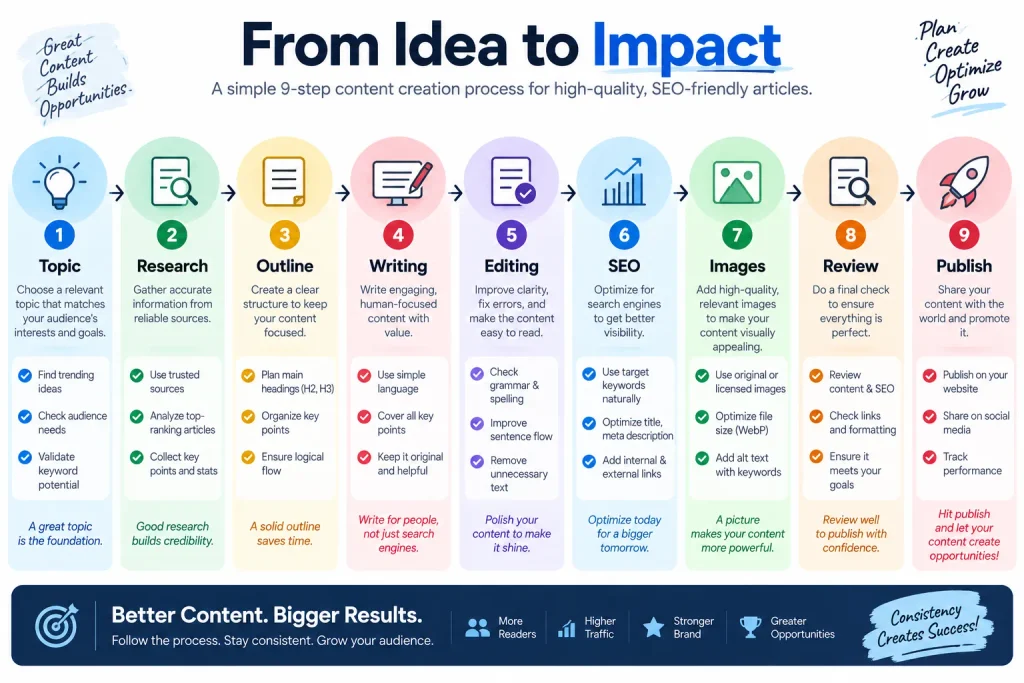
A workflow is the sequence of steps you follow to complete a task or project.
For example, a content workflow might look like:
Topic → Research → Outline → Writing → Editing → SEO → Images → Publishing
When each step is clearly defined, it becomes easier to know what should happen next.
A poor workflow may involve repeatedly switching between tasks, searching for missing information, or completing the same steps unnecessarily.
Improving your workflow means making the process clearer and more efficient.
1. Start With Clear Goals
Before beginning work, identify what you want to accomplish.
A vague goal such as:
“Work on the project.”
does not provide much direction.
A clearer goal could be:
“Complete the first draft of the project report.”
Specific goals make it easier to measure progress and determine when a task is finished.
Try to define the expected result before starting.
2. Plan Your Work Before Starting
A few minutes of planning can save considerable time later.
Before beginning a project, identify:
- What needs to be completed
- Which tasks are most important
- What information is required
- What deadlines exist
- Which tasks depend on other tasks
This creates a basic roadmap.
You do not need to plan every minute of your day. A simple list of important activities can be enough.
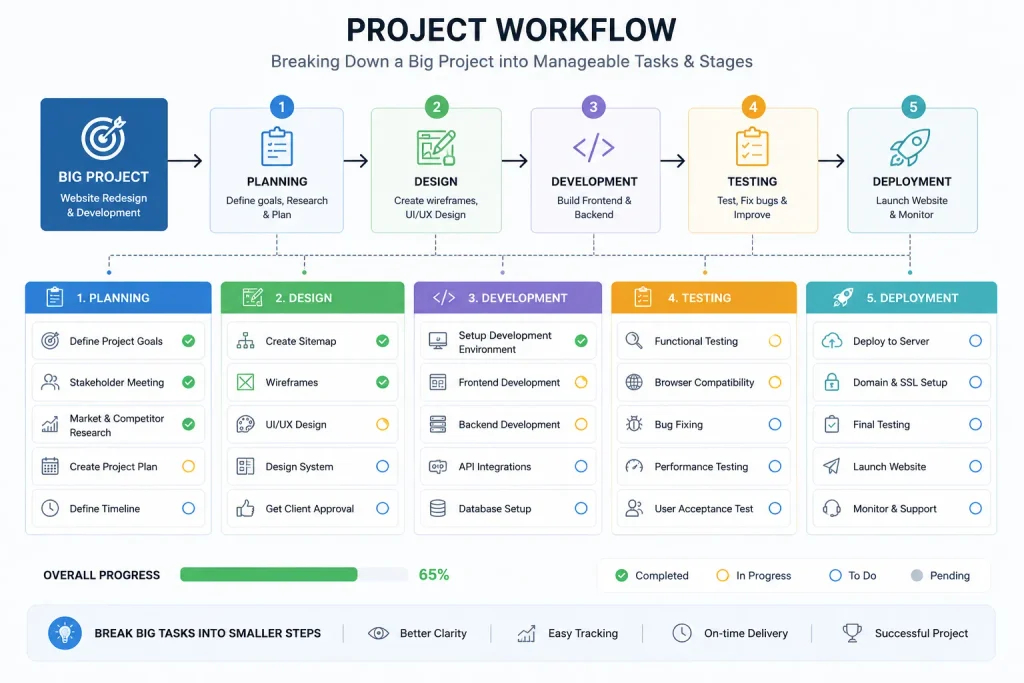
3. Break Large Projects Into Smaller Tasks
Large projects can feel difficult when viewed as one enormous task.
Instead, divide them into smaller steps.
For example, instead of:
Create a website
break the project into:
- Choose a topic
- Plan the structure
- Prepare content
- Create pages
- Add images
- Review the pages
- Test the website
- Publish
Smaller tasks are easier to understand and track.
4. Prioritize Important Work
Not every task deserves the same level of attention.
A useful system is to divide tasks into:
- High priority
- Medium priority
- Low priority
Start with the tasks that have the greatest impact or the closest deadlines.
Avoid spending most of your available time on small tasks simply because they are easy to complete.
5. Create a Repeatable Process
If you perform the same type of work regularly, create a standard process.
For example, if you publish articles frequently, create a repeatable workflow:
Research → Outline → Draft → Edit → Optimize → Add Images → Publish → Review
Once the process is established, you do not have to decide what to do from the beginning every time.
This can improve consistency and reduce unnecessary decision-making.
6. Use Checklists
Checklists are especially useful for repetitive work.
A checklist can help ensure that important steps are not forgotten.
For example, an article checklist might include:
- Confirm title
- Research topic
- Check keywords
- Write introduction
- Add headings
- Edit content
- Add internal links
- Create meta description
- Add images
- Review article
- Publish
A simple checklist can improve consistency without adding much complexity.
7. Reduce Task Switching
Constantly switching between tasks can make your workflow less efficient.
For example, if you are writing and repeatedly checking email, messages, and social media, your attention is being divided.
Try grouping similar activities together.
You could have separate periods for:
- Writing
- Research
- Communication
- Administration
- Review
This creates a more structured workflow.
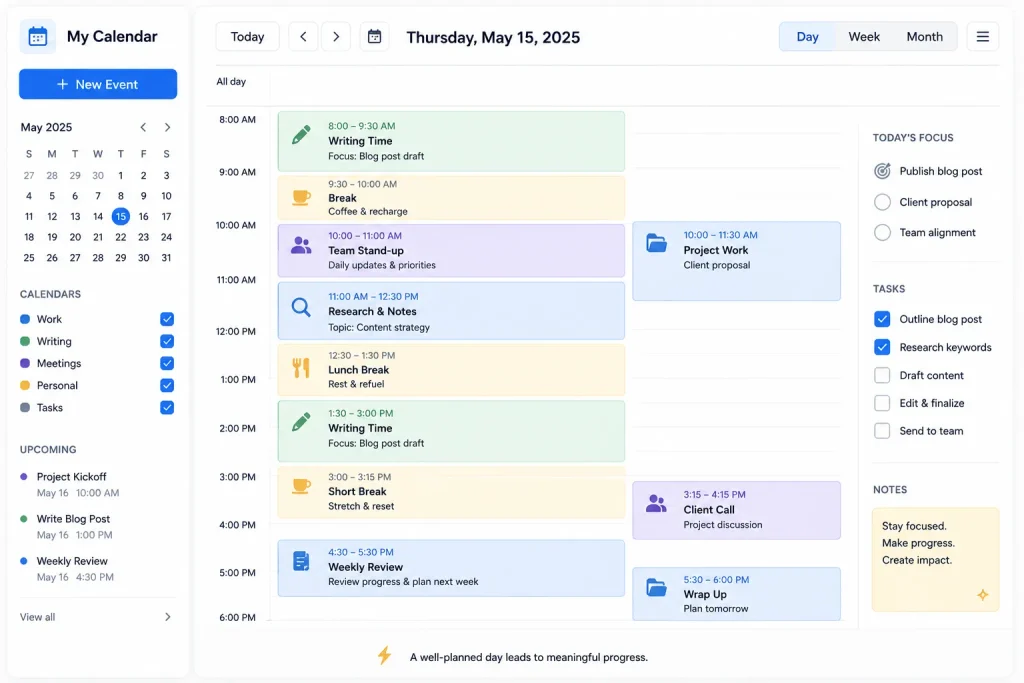
8. Use Time Blocking
Time blocking allows you to assign specific periods to specific types of work.
For example:
9:00–10:30: Writing
10:30–10:45: Break
10:45–12:00: Research
1:00–2:00: Administration
2:00–3:00: Project work
The schedule does not need to be perfect.
Its purpose is to provide structure and protect time for important activities.
9. Organize Your Digital Workspace
Your digital environment can affect your workflow.
Keep important files, folders, bookmarks, and documents organized.
Use clear folder names and descriptive filenames.
For example:
Website Content
- Drafts
- Published
- Images
- Research
- Archive
A logical structure makes it easier to find information when you need it.
10. Keep Important Information in One Place
Scattered information can create unnecessary work.
You might have project notes in one application, deadlines in another, and important instructions in a notebook.
Whenever possible, create a central location for project information.
This could include:
- Project goals
- Important links
- Notes
- Deadlines
- Task lists
- Progress updates
A central information source makes the project easier to manage.
11. Automate Repetitive Tasks
Automation can help reduce repetitive manual work.
Depending on the tools you use, automation may help with:
- Reminders
- Recurring tasks
- Notifications
- Reports
- File organization
- Routine updates
Before automating something, make sure the process is already clear.
Automating a poorly designed process can simply make an inefficient workflow happen faster.
12. Use Templates
Templates can save time when you repeatedly create similar documents or content.
Examples include:
- Article outlines
- Reports
- Emails
- Project plans
- Checklists
- Meeting notes
Instead of starting from an empty page every time, begin with a useful structure and customize it for the current project.
13. Set Up a “Next Action”
Sometimes a task remains unfinished because the next step is unclear.
Instead of writing:
“Website project”
write:
“Review the homepage content.”
A clearly defined next action removes uncertainty.
Whenever you stop working on a project, write down what should happen next.
This makes it easier to resume later.
14. Batch Similar Tasks
Task batching means completing similar activities together.
For example, if you need to write several short descriptions, complete them in one session instead of spreading them throughout the day.
You can batch:
- Emails
- Research
- Editing
- Data entry
- Content creation
- File organization
Batching can create a smoother workflow because you stay within the same type of activity.
15. Protect Focused Work Periods
Important work deserves uninterrupted attention.
During focused work periods:
- Silence unnecessary notifications
- Close unrelated browser tabs
- Keep your task visible
- Avoid unnecessary messaging
- Work toward one specific result
You can schedule communication and administrative tasks separately.
This helps protect time for activities that require deeper concentration.
16. Review Your Workflow Regularly
A workflow should not remain unchanged forever.
Once a week, ask:
- What worked well?
- What caused delays?
- Which steps were unnecessary?
- Where did I lose time?
- Which tasks could be simplified?
- Can anything be automated?
- Is there a better order for the steps?
Small improvements can gradually make the entire process more efficient.
17. Eliminate Unnecessary Steps
Sometimes a workflow becomes complicated because extra steps have been added over time.
Look at each stage and ask:
“Does this step provide real value?”
If a step does not improve the final result, consider simplifying or removing it.
A shorter workflow is not automatically better, but unnecessary complexity should be avoided.
18. Use the Two-Minute Rule Carefully
If a small task takes only a couple of minutes and completing it immediately will not interrupt important work, handling it quickly may make sense.
Examples include:
- Filing a simple document
- Confirming a small detail
- Adding a short note
- Updating a task status
However, do not allow small tasks to constantly interrupt important focused work.
Context matters.
19. Create an End-of-Day Review
At the end of your work period, spend a few minutes reviewing your progress.
Check:
- Completed tasks
- Unfinished tasks
- Upcoming deadlines
- Important messages
- Tomorrow’s priorities
This gives you a clean starting point for the next work session.
20. Keep Your Productivity System Simple
One of the biggest productivity mistakes is creating a system that is harder to manage than the work itself.
You may not need:
- Multiple task apps
- Complicated categories
- Dozens of reminders
- Extremely detailed schedules
A simple system with a task list, calendar, notes, and a weekly review may be enough.
The best productivity system is one you can actually maintain.
A Simple Workflow Improvement Formula
You can use this basic formula for almost any project:
1. Define
Clearly identify the desired result.
2. Break Down
Divide the project into smaller tasks.
3. Prioritize
Decide which tasks should happen first.
4. Schedule
Assign time or deadlines where necessary.
5. Execute
Complete the work according to the plan.
6. Review
Check the result and identify problems.
7. Improve
Change the workflow to make the next project easier.
This creates a continuous improvement cycle.
Example of an Improved Content Workflow
Suppose you regularly create website articles.
A basic workflow might be:
Choose Topic → Research → Write → Publish
An improved workflow could be:
Topic Selection → Keyword Research → Outline → Writing → Editing → SEO Review → Images → Internal Links → Final Review → Publishing
The second process may require more steps, but each step has a clear purpose.
You can then create a checklist or template so that the process becomes repeatable.
Common Workflow Mistakes
Trying to Do Everything at Once
Too many active tasks can make priorities unclear.
No Clear Deadline
Without a target date, important tasks may continue to be postponed.
Poor File Organization
Searching for documents repeatedly wastes time.
No Standard Process
Repeatedly deciding how to perform the same task creates unnecessary work.
Overcomplicated Productivity Systems
Complex systems can become distractions.
Never Reviewing the Workflow
Problems remain when you never examine how the work is actually being completed.
Frequently Asked Questions
How can I improve my workflow?
Start by defining clear goals, breaking projects into smaller tasks, prioritizing important work, creating repeatable processes, and reviewing your workflow regularly.
What is the easiest productivity improvement?
One of the easiest improvements is creating a clear task list and choosing your most important tasks before beginning work.
Does automation improve productivity?
Automation can reduce repetitive work when used appropriately. However, the underlying process should be organized before automation is added.
Why is task switching bad for workflow?
Frequent task switching can make it harder to maintain concentration and can create additional mental effort when moving between unrelated activities.
How often should I review my workflow?
A short daily review and a more detailed weekly review can help keep your workflow organized and identify opportunities for improvement.
Conclusion
Improving your workflow does not require complicated productivity methods. The most effective changes are often simple: define clear goals, break large projects into manageable tasks, prioritize important work, organize information, and create repeatable processes.
Tools such as calendars, task lists, checklists, templates, and project boards can support these techniques.
The key is consistency.
When you regularly review how you work and remove unnecessary steps, your workflow can gradually become faster, clearer, and easier to manage.
Start with one or two improvements instead of changing everything at once. Build a system that fits your responsibilities, maintain it consistently, and adjust it as your needs change.


